Article
Feb 13, 2026
How to Analyze HubSpot Support Tickets (The Automated Way)
Turn your HubSpot Service Hub into a goldmine. Learn the automated way to analyze support tickets, deduplicate deal emails, and prioritize your roadmap based on real Company MRR.
For most product teams, the HubSpot Service Hub is where their support team goes to close tickets. It is operational, transactional, and quite cluttered.
But hidden inside those thousands of closed tickets and email chains attached to deals is the one thing every PM likes: unfiltered, high-volume user feedback.
Your customers are telling you exactly what is wrong with your product, why they are churning, and what features they are willing to pay for. But right now, that data is trapped in thousands of emails. It is siloed away in closed conversations that you simply don't have the bandwidth to read.
True User Feedback Often Stays Buried in HubSpot
The problem is the sheer scale of it.
If your support and sales teams are handling 500+ interactions a week, manual review becomes physically impossible. Product teams are drowning in feedback scattered across support tickets, emails, and conversation logs
Trying to manually go through HubSpot is:
Time-consuming: You lose hours reading through tickets just to understand basic patterns.
Error-prone: Similar requests often get logged as separate requirements, cluttering your backlog.
Inconsistent: Different team members categorize feedback differently, leading to "gut-feel" prioritization rather than data-driven decisions.
Because of this friction, most teams default to ignoring the raw data. They rely on anecdotal summaries from Support Reps or Sales Directors ("I feel like everyone is asking for Dark Mode").
This is dangerous. It means you are building based on interpretations of a few people, not what actually drives your revenue.
What You Need to Solve For to Go From Operational Noise to Strategic Insight
To analyze support tickets from HubSpot without manual review:
Connect your HubSpot account to an intelligence platform (like ProductPulse).
Sync your Service Hub tickets and Deal emails.
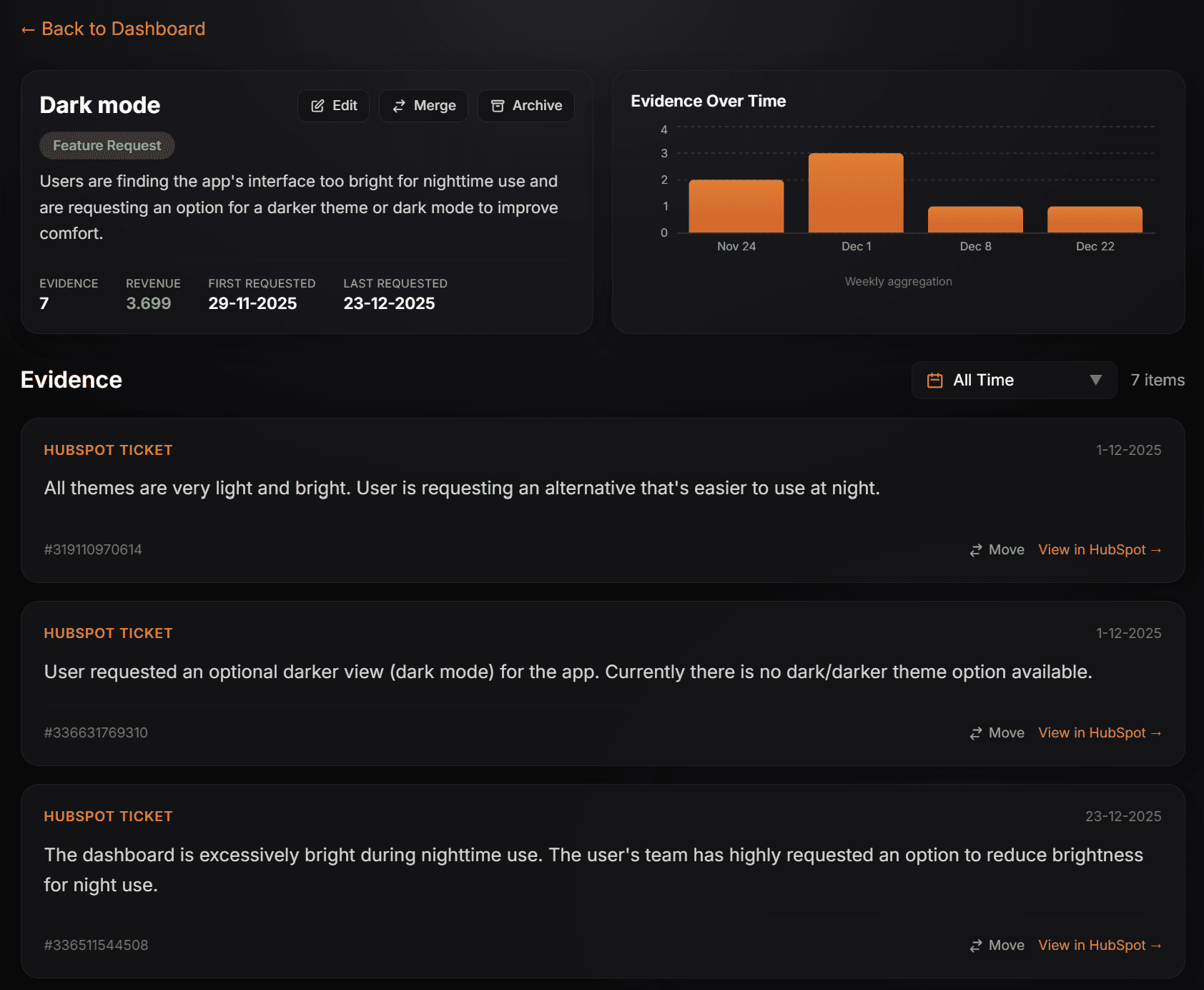
Use AI to deduplicate requests (e.g. grouping "dark mode" with "screen is too bright").
Map ticket volume to Company MRR to identify high-value needs.
To unlock this goldmine without hiring a dedicated research team to read thousands of tickets, you need to fundamentally change how data flows between your Service Hub and your Product Roadmap.
You don't need more "reports", you need an intelligent layer that sits between support and product. You need to solve the access and noise problems that don’t scale cost-effectively if done by humans:
1.Solving the Access Problem (The Where):
The reason most feedback is ignored is friction. If you have to ask for a CSV export or log into HubSpot to search for keywords, it won’t happen. The data needs to be easily accessible. Ideally you want a continuous flow of support tickets and the nuanced context hidden in deal emails, running in the background while your team sleeps.
2. Solving the Synthesis Problem (The How):
Access is only half the battle. If you simply piped 500 tickets into your backlog, you’d just create a different kind of mess. "Garbage in, garbage out" gets used often because it is true.
To make the data usable, you need to move from Keywords to Intent.
Simple keyword matching misses the connection between "Dark mode" and "This theme is too bright at night."
Instead use intent deduplication which uses AI to understand th meaning behind the users mail or support ticket. It recognizes that three different customers are reporting the same underlying friction and groups them into a single, actionable requirement.
This is the workflow we built ProductPulse to execute: turning a noisy stream of raw tickets into a clean, prioritized list of customer needs.
Why you want to prioritize revenue, not volume
Once your feedback is synthesized, the biggest trap is prioritizing based on volume. Fixing the bug that 50 people complained about. But what if those 50 people are on your free plan?
This is where a live connection with Hubspot becomes really valuable. By connecting to HubSpot, ProductPulse doesn't just pull the text; it maps the feedback to your Company records including what each customer pays you.
This allows you to see the aggregate MRR (Monthly Recurring Revenue) or ARR behind every single feature request. You can instantly differentiate between a "nice-to-have" request from free users and a critical friction point blocking a $50k deal.
It turns your roadmap into a revenue driver, helping you build exactly what your highest-value customers actually need.
How to Analyze HubSpot Data Without Worrying About PII/GDRP?
Product Managers often hesitate to sync support data because of the compliance nightmare. Raw tickets are full of sensitive data such as emails, phone numbers, and personally identifiable information (PII) that shouldn't live outside your secure Help Desk.
You can remove sensitive data manuallyl using data anonymization tools (we built one you can use for free here) Or you can automate this process completely in using ProductPulse.
Before any processing happens, our pipeline uses a rigorous regex-based scrubbing system. It detects and removes email addresses, phone numbers, bank account numbers, and other sensitive identifiers. Then it uses AI to remove any remaining context based PII and summarizes the intent and stores that summary. This means no raw customer data is ever stored in our database. You get the product insights you need without any risk of losing customer data.
How to Verify Source Data Before Building
AI is powerful, but sometimes a summary isn't enough. You need to understand the nuance, the specific tone of a frustrated customer or the exact context of a deal-breaker email.
We believe you should always be able to verify the "why" behind the "what."
That’s why every single piece of feedback in ProductPulse includes a direct "View in HubSpot" link. With one click, you can jump from the high-level roadmap item straight into the original support ticket or deal record for full context. You stay in the driver's seat, using AI to surface the signal while retaining instant access to the source truth.
How You Can Get Started Today
The difference between a good product team and a great one often comes down to how close they are to the customer. Your HubSpot Service Hub is already capturing your customers’ voice every single day.
Stop letting that data sit in a graveyard of closed tickets. It’s time to automate the busy work, filter out the noise, and turn your support history into your most valuable strategic asset.
Check out how to connect to hubspot here or request your free trial using the form below.