Article
Jan 13, 2026
Why Scaling Customer Feedback Analysis Requires More Than ChatGPT
In today's article we’ll explore how to build a scalable intelligence engine by mastering four key areas: prepping your data for a Privacy-First approach, identifying Core User Needs, leveraging Semantic Clustering, and finally, anchoring every decision to Customer Revenue.
Product managers are no longer asking if they should use AI, but how to use it effectively. If you've already started using our Ultimate Prompt Guide, you know that a well-crafted prompt can turn support tickets into a clear requirements in seconds.
However, as your company grows, customer feedback analysis becomes a volume problem. When you are receiving hundreds of tickets a week across HubSpot, Zendesk, and Slack, the "copy-paste" method can become too slow and it creates a fragmented view of your customers' true needs.
The Privacy-First Principle: Scrubbing Personal/GDPR Data Before It Hits the LLM
One of the biggest risks in manual customer feedback analysis is the unintentional handling of PII (Personally Identifiable Information). When you copy-paste a raw support ticket into a standard AI window, you might be sending sensitive data, like email addresses, phone numbers, or even credit card snippets, to a third-party model without a safety net.
To handle your customer data safely, you should remove PII before you give it to AI.
Audit for PII: Before running a prompt, scan the text for specific patterns like Social Security numbers, IP addresses, and sensitive URLs.
Anonymize the Context: Replace specific identifiers with generic placeholders (e.g., replace "john.doe@email.com" with "[EMAIL]") to maintain the context of the problem without the risk.
Use Regex Patterns: If you are scaling your process, you can use basic regular expressions to automate this cleaning step before your prompt even runs.
Scrubbing PII also ensures your AI focuses purely on the canonical need rather than getting distracted by specific user identifiers, giving you better results.
Moving from Keywords to "Core User Needs"
Most PMs start by searching for keywords like "UI" or "Integration," but this often leads to inconsistent results because different users describe the same pain points in vastly different ways.
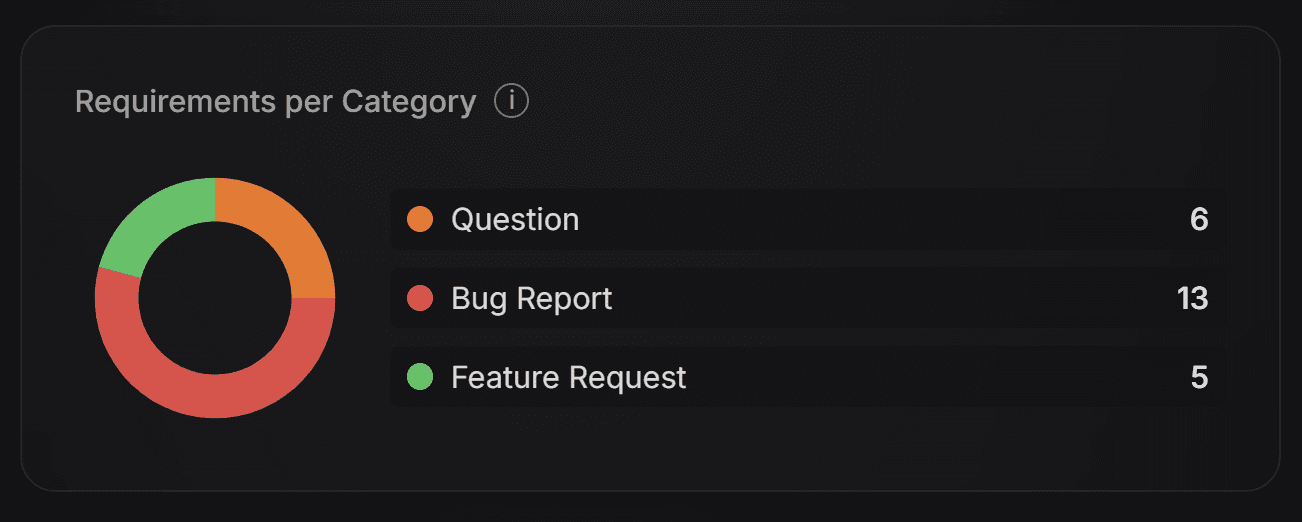
To solve this, you need to implement intent classification. Instead of just summarizing a ticket, your first goal should be to determine what the customer is actually trying to achieve:
Feature Request: Is this a request for new functionality?
Bug Report: Is something broken or not working as intended?
Question: Is this simply a request for clarification?
By categorizing the intent first, you can prioritize Bug Reports for your engineering team while keeping Feature Requests in a separate bucket for roadmap planning.
The Power of Semantic Clustering
You know the frustration of "hidden duplicates" in spreadsheets. One customer writes, "I need a dark mode," while another says, "The white background is causing eye strain at night." In a traditional keyword search, these would never touch. But in customer feedback analysis, these can be the same requirement. Identifying these connections is known as Semantic Clustering.
The Lesson: Grouping by "Problem" instead of "Feature"
The mistake most teams make is grouping feedback by the solution the customer suggests (e.g., "Dark Mode"). Instead, you should group by the Problem Statement.
When you focus on the underlying pain, different phrasings naturally gravitate toward each other:
The Problem: "High contrast interface causes visual discomfort in low light."
Customer A says: "Screen is too bright"
Customer B says: "Needs a night version"
Customer C says: "Dark mode please"
How Semantic Similarity Works (The Simple Version)
Think of Semantic Similarity like a map. Every piece of feedback is assigned a set of coordinates based on its meaning, not its spelling. If two comments are "geographically" close on that map—like "hurts my eyes" and "too bright"—the system knows they belong together, even if they share zero identical words.
You can start doing this manually by standardizing your labels. Instead of tagging tickets with "Feature: Dark Mode," tag them with the specific problem they describe or use AI to extract the problem and search for overlapping problems.
Weighing the "Voice of the Customer" Against Revenue
Once you have used semantic clustering to group your tickets, you’ll likely find yourself with a list of 20 or 30 distinct Core User Needs. The next challenge is deciding which one to build first. Most teams fall into the trap of the loudest voice or recency bias, prioritizing whatever has the most recent or most aggressive feedback.
To make objective decisions, you must turn qualitative feedback into quantitative data by mapping volume against Customer Value.
The Lesson: Volume vs. Value
A request that appears 50 times from your "Free Tier" users may be less critical for your business than a request that appears 5 times from your "Enterprise" users. By linking your support tickets to customer MRR (Monthly Recurring Revenue) or ARR (Annual Recurring Revenue), you can calculate the Impact Score for every requirement.
A simple framework for this is the Value-Volume Matrix:
High Volume / High Revenue: Your "Must-Haves." These are critical for retention and growth.
Low Volume / High Revenue: Strategic gaps that might be blocking large deals.
High Volume / Low Revenue: Common friction points that could be solved with better UX or documentation or could unlock a new customer segment.
This shift allows you to move away from "gut-feel" prioritization and toward data-driven insights that align with your company’s bottom line.
From Manual Entry to Linked Data
In a manual setup, this means adding a column to your spreadsheet for the "Annual Contract Value" of the customer who sent the ticket. While tedious, this step ensures that your roadmap isn't just a list of popular ideas, but a strategic document built on real business impact.
Conclusion: When to Automate Your Pipeline
We have looked at Scrubbing, Classifying, Clustering, and Weighting. Combined they are a great start for professional customer feedback analysis. If you are a solo founder or a PM at a seed-stage startup handling ten tickets a week, managing this manually or via prompts is a fantastic way to stay close to your users.
However, there is a "scaling wall" that every growing product team eventually hits. When your feedback volume jumps from 10 to 100+ tickets a week across HubSpot, Zendesk, and Slack, the manual approach breaks:
This is exactly why we built ProductPulse. It’s not just an AI tool; it’s an automated intelligence pipeline that executes this process automatically and at scale.
ProductPulse connects directly to your existing tech stack and runs your entire workflow while you sleep:
Privacy-First Scrubbing: It automatically removes emails, phone numbers, and sensitive identifiers before processing.
Intelligent Extraction: It uses the latest models available to identify the Core User Need and categorize it by intent.
Semantic Matching: It uses 1536-dimensional embeddings to cluster similar requests, even if they use completely different wording.
Revenue Prioritization: It maps these needs directly to your CRMs customer revenue, showing you the exact MRR impact of every feature on your roadmap.
Scalable Product Intelligence Starts Where Prompting Ends
The goal of the Ultimate Prompt Guide was to give you the logic to understand your customers. The goal of ProductPulse is to give you the time to actually build for them.